Posts tonen met het label set defaults. Alle posts tonen

01 december 2018

Set the default shape properties for every new presentation in PPT 2013

When you draw a shape in PowerPoint you always get an outline. In almost all cases you do not really need it. To save time and effort you can alter your custom theme in such a way you no longer need to remove the outline of your shapes.

You can change the default shape on a presentation basis. In that case it suffices to remove the outline of a shape, right-click it and choose set as default shape. See my previous article Set default shape in PPT 2007 which is still valid for the current versions of PPT.

To do this for all your presentations you need to set the default in your custom theme (this does not work for the built-in themes!)

Create a new presentation based on your custom theme.

Draw your shape and remove the outline, if necessary change other properties.


Right-click the shape and choose Set as default shape.


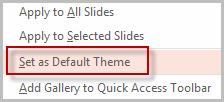
Now right click the custom theme you used in the Themes group. In the quick menu click Set as default theme.

The shape you drew will not be saved with the theme just its properties.

25 september 2008

Set your default shape, line, textbox in PPT 2007 - Instellen van een standaard vorm, lijn, tekstvak in PPT 2007

Set your default Shape, line, textbox in PPT 2007

In PowerPoint 2007 it is possible to set your default formatting for shapes, lines and textboxes without one interfering with another. Definitely an improvement on PPT 2003.
First set the formatting to your liking then right click and choose set as default for shapes, lines or textboxes in the context menu.

Instellen van een standaard vorm, lijn, tekstvak in PPT 2007

In PowerPoint 2007 is het nu mogelijk om de standaardinstellingen van vormen, lijnen en tekstvakken vast te leggen. Een duidelijke verbetering ten opzichte van PTT 2003.

Maak de vorm, lijn of het tekstvak op zoals je dat wilt, rechtsklik erop en kies uit het snelmenu de gewenste optie: instellen als standaardvorm, instellen als standaardlijn, instellen als standaardtekstvak.