Excel data are often linked for internal use. That way you can always have the latest data available. But if you have to send the presentation to an external user it is necessary to break the links.
If you want to see how many links are included in your presentation go to File - Info - on the right hand side you will see all the properties of the presentation, at the bottom there is a link 'Edit links to files'. That link allows you to edit all of the linked files.

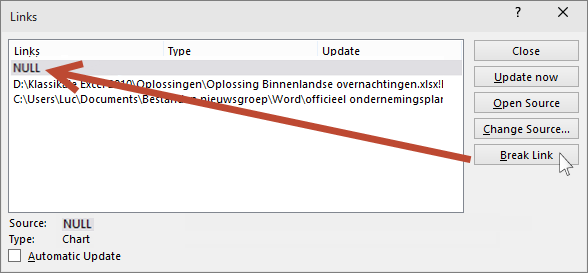
In the dialog box that follows you can see a list of all the linked files in the presentation. If you select a link the original path and type of object will be shown at the bottom of the dialog. In our case this was a chart from Excel.

If you want to see how many links are included in your presentation go to File - Info - on the right hand side you will see all the properties of the presentation, at the bottom there is a link 'Edit links to files'. That link allows you to edit all of the linked files.

In the dialog box that follows you can see a list of all the linked files in the presentation. If you select a link the original path and type of object will be shown at the bottom of the dialog. In our case this was a chart from Excel.

Links from Excel can point to a complete workbook, graph or range of cells. Other links can be present in the example above there is a link to a Word document.
To break the link to any item just click on the Break Link button. The link to the chart will remain in the list but will get the NULL property. This is a term in computer language that refers to a missing or unknown value in the file.
Now, if you right click the chart in the presentation the Edit data item will be greyed. You can still format the chart in PowerPoint but the data are no longer available.
If you break the link to a workbook or range of cells the object will turn into a picture which can't be edited anymore. When you select the object you will see the contextual tab Picture tools appear.
Be sure to save your presentation under a different name if you still want to update to the latest data.
To break the link to any item just click on the Break Link button. The link to the chart will remain in the list but will get the NULL property. This is a term in computer language that refers to a missing or unknown value in the file.

Now, if you right click the chart in the presentation the Edit data item will be greyed. You can still format the chart in PowerPoint but the data are no longer available.
Be sure to save your presentation under a different name if you still want to update to the latest data.
