Posts tonen met het label cel achtergrond. Alle posts tonen

01 juli 2016

Een afbeelding in achtergrond van tabelcel plaatsen in PPT 2013

Je kan in PPT gemakkelijk een volledige tabel een afbeelding als achtergrond geven. Zie daarvoor mijn artikel Gebruik een PowerPoint tabel met afbeelding in de achtergrond.

Dat kan ook voor individuele cellen.

Maak je tabel met om het even dewelke tabelstijl.
Voeg je afbeelding toe aan de dia.
Pas de cel aan waar je de afbeelding wil plaatsen. Respecteer daarbij de hoogte/breedte verhouding.


Selecteer de afbeelding en kopieer ze via het lint Start en de knop Kopiƫren.
Plaats de cursor in de cel, klik rechts en kies voor Vorm opmaken.

Klik op Opvulling
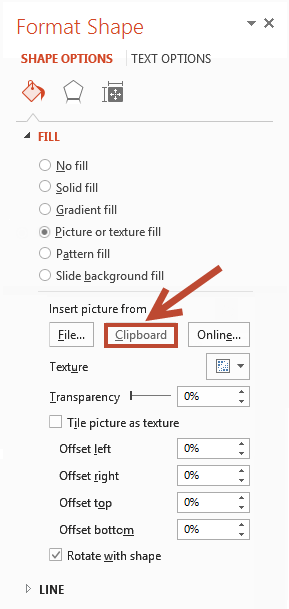
Activeer het keuzerondje Opvulling met afbeelding of bitmappatroon
Klik op Klembord

De afbeelding vult nu de cel. Verwijder de originele afbeelding en je bent klaar. Indien je dat wil kan je de tabel nog aanpassen, respecteer daarbij wel de hoogte/breedte verhouding.


15 juni 2016

Put a picture in background of a table cell in PPT 2013

In PPT you can easily put a picture as the background for a complete table.
See my article Using PPT table with a picture background

But what if you only want to put a picture in a single table cell?

Well that is not difficult at all.

Make your table using whatever style you like.
Insert your picture on the slide.


Select your picture and click the copy button on the Home tab.
Size the cell you want to fill.
Right click in the cell, choose Format Shape
Click Fill and then the radio button Picture or texture fill.


Click the Clipboard button, the picture now fills the cell.


Finally remove the original picture.


You can adjust the width and height of the table respecting the aspect ratio, the picture will stay in the cell.